The module is used for building, managing, and maintaining relationships with customers. Thanks to the universal features and solutions included in the module, it can be utilized in any company, regardless of its size, profile, or industry. Its flexibility allows for customization to the individual needs of the enterprise, making it an ideal tool to support business development. CRM, combined with other Sugester modules, serves as a knowledge center about a given customer, enabling comprehensive management of business relationships, which is a key element in building long-term bonds and increasing customer loyalty.
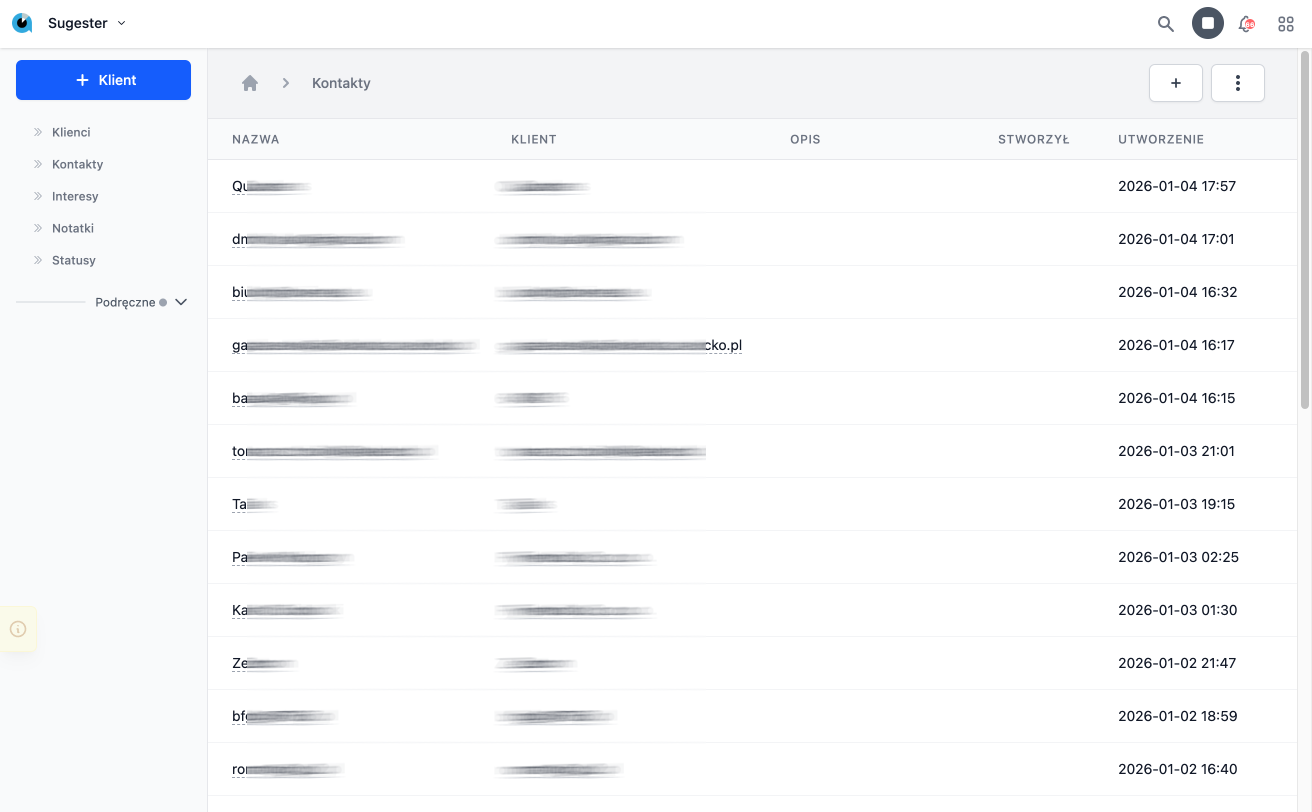
The CRM module includes the following functionalities:
Customers
This section contains a list of all customers entered into the system, both potential and current. Users can view the details of each customer, such as contact information, history of phone communications, chat conversations, or email messages. The customer cards also display a list of transactions or documentation outlining the terms of cooperation. The system also allows for quick filtering and searching of customers by various criteria, such as status or industry. This functionality helps in effectively managing large customer databases and facilitates establishing new contacts.
Contacts
The Contacts tab contains all contacts added to the system. Here, detailed information about contact persons associated with customers can be recorded, such as their positions, phone numbers, or email addresses. This feature facilitates quick access to necessary information during conversations or negotiations. Additionally, the system allows for grouping contacts by customers, which increases data clarity. Such organization enables smoother collaboration in teams where multiple people work with the same customer.
Statuses
In the Statuses tab, you can create a list of statuses that help determine the stage of cooperation with the customer – whether it is, for example, a potential, paying, or archived customer. These statuses allow for quick recognition of each customer's situation and taking appropriate actions. The ability to customize statuses allows the module to be tailored to the specific needs of the company, regardless of the industry, enabling enterprises to manage their resources more effectively and focus on key customers.
Opportunities
Opportunities allow for adding and verifying sales opportunities and completed transactions. This functionality enables tracking all stages of the sales process, from the first contact with the customer, through negotiations, to the finalization of the contract. As a result, companies can accurately analyze which actions yield the best results. Combined with customer segmentation, opportunities enable the identification of which economic sectors hold the greatest potential for the company's growth. This analysis is invaluable in the process of making strategic decisions, such as resource allocation or developing new offers.
Notes
Notes as a complement to CRM functionality allow for additional descriptions of a given customer, adding valuable information defining their specifics, unusual arrangements, or requests. This functionality helps maintain complete knowledge about the customer in one place, which is particularly useful in teamwork. Notes can be edited and updated in real-time, allowing for dynamic adaptation to changing customer needs.
- [Tags on client card – quick categorization of cooperation](https://sugester.intum.pl/kb/sugester-v2-en/tags-on-client-card-categorization.md) — Tags on client card – quick categorization of cooperation
Tags are one of the most effective ways to quickly organize your customer database. With th...
- [Merging clients – how to quickly remove duplicates](https://sugester.intum.pl/kb/sugester-v2-en/merging-clients-removing-duplicates.md) — Merging clients – how to quickly remove duplicates
The client database is a living organism – sometimes it happens that through data import or manual...
- [Fetch data from GUS registry option](https://sugester.intum.pl/kb/sugester-v2-en/fetch-data-from-gus-registry.md) — Fetch data from GUS registry option
Data entry automation is the key to an efficient CRM. Instead of manually entering addresses or REGON numbers, yo...
- [Adding a note on the client card](https://sugester.intum.pl/kb/sugester-v2-en/adding-a-note-on-the-client-card.md) — Adding a note on the client card
Maintaining order in client relationships requires a place to record agreements, comments, or specific requirements....
- [Clients — creating and editing records](https://sugester.intum.pl/kb/sugester-v2-en/clients-creating-and-editing-records.md) — The CRM module allows you to maintain a database of clients and contacts. The client file is a central place where you collect contact information, co...
- [Contacts — people associated with the client](https://sugester.intum.pl/kb/sugester-v2-en/contacts-people-associated-with-the-client.md) — Contacts are individuals associated with a customer record in the CRM — sales representatives, decision-makers, employees of the client’s company. A c...
- [Sales Opportunities — Deal Management](https://sugester.intum.pl/kb/sugester-v2-en/sales-opportunities-deal-management.md) — Sales opportunities (deals) are potential transactions with clients. They allow you to track the sales process from the first contact to closure.
Nam...
- [CRM Statuses — Stages and Labels](https://sugester.intum.pl/kb/sugester-v2-en/crm-statuses-stages-and-labels.md) — CRM statuses are used to mark the stages of contacts, sales opportunities, and customers. You define your own statuses tailored to the sales process i...
- [CRM Notes — Contact History](https://sugester.intum.pl/kb/sugester-v2-en/crm-notes-contact-history.md) — CRM notes allow you to document the history of interactions with the client — phone calls, meetings, agreements, observations.
Title
The title of th...
- [Customer Card](https://sugester.intum.pl/kb/sugester-v2-en/customer-card.md) — The client card is the central place where you gather all data about the contractor — from basic contact information to the status of cooperation, his...
- [Contact Card](https://sugester.intum.pl/kb/sugester-v2-en/contact-card.md) — Name - full name of the contact
Photo - allows adding a photo of the contact for easier identification
Description - short description of the cont...
- [Interest card](https://sugester.intum.pl/kb/sugester-v2-en/interest-card.md) — Name: In this field, you can enter a short name that facilitates the quick identification of a specific case in lists and reports.
Description: This...
- [Note Card](https://sugester.intum.pl/kb/sugester-v2-en/note-card.md) — Name: In this field, you can enter a short, unique title that will allow you to quickly identify the main topic of the note in the list.
Content: Th...